Python gives you a lot of control when you want to automate tasks.
Trading is one area where that control can turn into something practical. Many beginners start with manual trades, then realize they cannot stay in front of charts for hours every day.
A simple trading bot can help with that. It can follow rules, watch price levels, and react when conditions match your setup.
You still stay in control, but you do not need to sit there and wait for every move.
What A Trading Bot Actually Does
A trading bot follows rules you define in code. It does not guess or react based on emotion. At a basic level, a bot can:
- Monitor price changes
- Check indicators
- Open and close trades
- Manage risk with stop-loss and take-profit
Example: You can build a bot that buys when price touches a support level and sells when it reaches resistance. The bot follows that rule every time without hesitation.
That consistency helps remove emotional mistakes.
Tools You Need Before Writing Code
You do not need a complex setup to begin. A few tools are enough to get started.
You should have:
- Python installed on your computer
- A code editor like VS Code
- Access to market data
- A trading platform that supports execution
Many developers connect their Python scripts to platforms like MetaTrader 4, since it allows trade execution and supports automation workflows.
A clean setup saves time later. Make sure everything runs smoothly before you move forward.
Build A Basic Strategy First
Your bot needs clear instructions. Without a strategy, code does nothing useful. Start with something simple. Avoid complex logic in the beginning.
A basic strategy might include:
- Entry rule based on support or resistance
- Exit rule with a fixed profit target
- Stop-loss to limit risk
Example: A bot can buy EUR/USD when price drops to a known support level and close the trade after a 20 pip gain or a 10 pip loss.
Clear rules make coding easier. You know exactly what the bot needs to do.
Writing Your First Script
Once your plan is ready, you can start coding. Keep your first script simple.
A basic structure includes:
- Fetching price data
- Checking conditions
- Sending a trade command
Here is a simplified example:
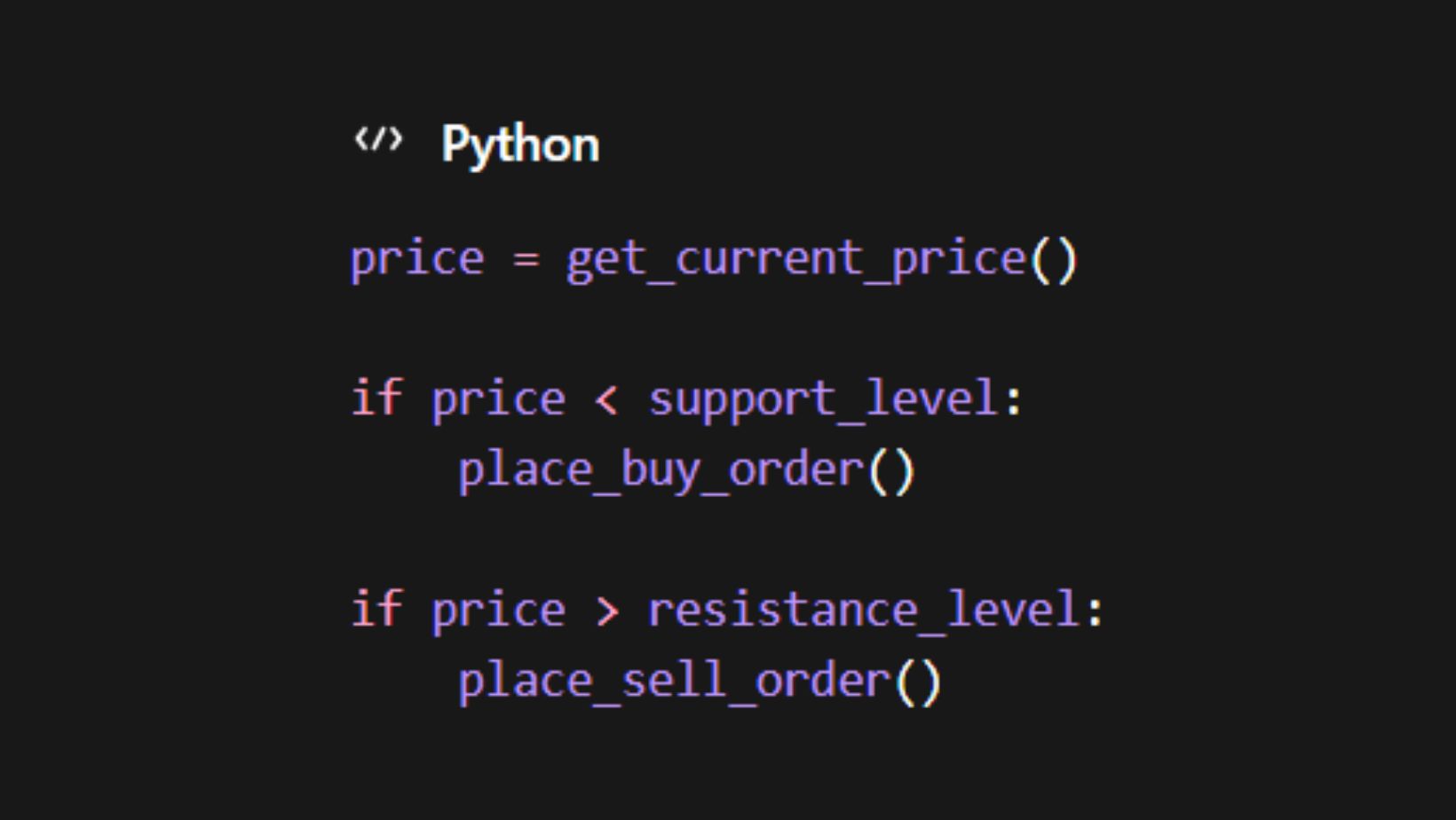
This logic shows how a bot reacts to price levels. Real scripts include more checks, but this gives you a starting point.
Focus on clarity, not complexity.
Connecting Python To A Trading Platform
Your bot needs a way to execute trades. Python alone cannot place orders without a connection. You can use the MetaTrader 4 PC.
It supports trade execution and works well with automated strategies. Many traders use it because it handles orders quickly and provides stable performance.
Once connected, your script can send commands directly to the platform. That turns your code into an active trading system.
Test Everything Before Going Live
Never use real money right away. Testing protects your account and helps you fix errors.
You should:
- Run your bot on historical data
- Use a demo account
- Check how it reacts to different market conditions
Example: A strategy may work well during stable trends but fail during sudden price spikes. Testing helps you spot that issue early.
Take your time here. A small mistake in code can lead to large losses.
Improve Step By Step
Your first bot will not be perfect. That is normal.
You can improve it by:
- Adding filters to avoid bad trades
- Adjusting entry conditions
- Refining risk management rules
Avoid adding too many features at once. Each change should have a clear purpose.
Example: If your bot enters trades too often, you can add a trend filter to reduce false signals. Small improvements lead to better performance over time.
Keep Your Setup Simple
Many beginners try to build complex bots too early.
That often leads to confusion and errors. A simple bot with clear logic performs better than a complicated one with too many conditions.
Focus on:
- Clean code
- Easy-to-read logic
- Reliable execution
You can always expand later once you understand how your bot behaves.
Conclusion
A simple trading bot can save time and reduce emotional decisions. Python gives you the tools to build one step by step, even with basic knowledge.
Start with a clear strategy, connect it to a reliable platform, and test everything before using real money.
Keep your setup simple and improve it gradually. Over time, your bot can become a useful part of your trading process.
Frequently Asked Questions
Can you build a trading bot without coding experience?
Yes, you can start with basic tutorials and simple scripts.
Many beginners learn by modifying existing examples and testing small changes. Over time, your understanding improves as you work with real code.
How long does it take to build a working trading bot?
A simple bot can take a few hours to build, but testing and refining it can take days or weeks. Most of the time goes into making sure the bot performs well under different conditions.
Is automated trading better than manual trading?
Automation helps with consistency and speed, but it depends on your strategy.
Some traders prefer manual control, while others rely on bots for execution. Both approaches can work when used correctly.
Do trading bots guarantee profit?
No, a trading bot only follows rules. If the strategy is weak, the bot will still lose money. Success depends on your logic, testing, and risk management, not the automation itself.